实现一个简单的目录功能,当点击目录按钮时能够跳转到对应的标题,并高亮显示当前选中的目录,同时对页面滚动进行监听,在页面滚动到标题时同样高亮对应的目录按钮。
布局
首先将页面分为左右两个部分,因为左侧为目录且固定在页面中,所以设置为fixed,右侧则为内容部分,为不与目录重叠,添加margin值来空出位置。
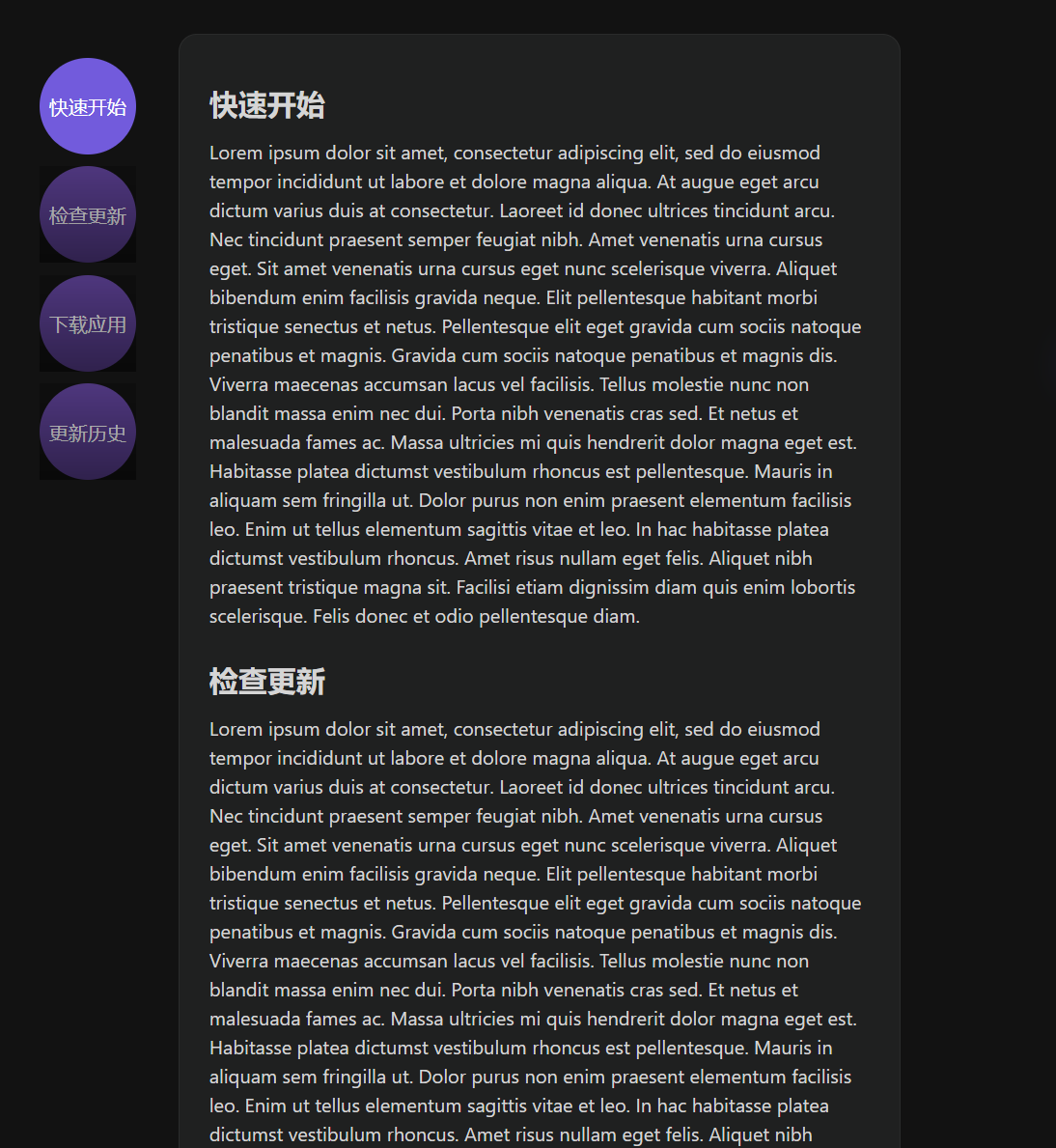
跳转标题
由于在布局中,给不同的段落设置了对应的id,在按钮的点击事件中传入id参数,然后在函数中通过ref获取到整个内容部分的根元素,在根元素中通过传入的id进行querySelector,得到要跳转的段落。通过scrollIntoView方法实现跳转。
const content_container = ref(null);
function changeMenu(item:any) {
  const el = content_container.value.querySelector(`#${item.value}`);
  if (el) {
    el.scrollIntoView({ behavior: 'smooth' });
    console.log(el.offsetTop);
  }
}
监听滚动事件
首先遍历所有的段落,根据每个段落的offsetTop为自定义的属性scrollTop设置初始值,该属性用于判断页面滚动到了哪个部分。(即每个段落距离根元素顶部的距离,也就是他们在根元素中的起始位置)
之后对根元素添加滚动的事件监听器,并通过根元素的scrollTop属性得到根元素滚动的距离(可视窗口向下移动了多少),然后将该scrollTop的值与各段落的scrollTop属性进行比较,当两者差值的绝对值小于50时即视为页面已经滚动到了该段落,则更新目录的高亮按钮。
onMounted(()=>{
    sections.value.forEach((item)=>{
      const el = content_container.value.querySelector(`#${item.value}`);
      if (el) {
        item.scrollTop = el.offsetTop;
      }
    })
    content_container.value.addEventListener('scroll', (event) => {
      console.log(content_container.value.scrollTop);
      sections.value.forEach((item)=>{
        if(Math.abs(item.scrollTop-content_container.value.scrollTop)<50){
          currentValue.value = item.value;
        }
      })
    });
})
高亮的判定
为了实现目录按钮高亮的变更,设置一个变量currentValue来表示当前显示的段落id,当当前显示的段落id与目录按钮对应的段落id相同时,则该目录按钮应该高亮,为其添加active类来修改样式。
<div class="nav-item"
          v-for="(item, index) in sections"
          :key="item.name"
          :index="index"
          @click="changeMenu(item)"
          :class="currentValue === item.value ? 'active':''"
          >
          <span class="nav-item-mask" v-if="currentValue !== item.value"></span>
          {{ item.name }}
      </div>
完整代码
其中html部分中的每个模块可以通过v-for来遍历生成。
<template>
  <div class="main">
    <div class="nav-container">
      <div class="nav-item"
          v-for="(item, index) in sections"
          :key="item.name"
          :index="index"
          @click="changeMenu(item)"
          :class="currentValue === item.value ? 'active':''"
          >
          <span class="nav-item-mask" v-if="currentValue !== item.value"></span>
          {{ item.name }}
      </div>
    </div>
    <div class="content" ref="content_container">
      <div class="container">
        <div id="Start" class="content-item">
        <h2 class="name">快速开始</h2>
        <p>Lorem...</p>
      </div>
      <div id="UpDate" class="content-item">
        <h2 class="name">检查更新</h2>
        <p>Lorem...</p>
      </div>
      <div id="DownLoad" class="content-item">
        <h2 class="name">下载应用</h2>
        <p>Lorem...</p>
      </div>
      <div id="History" class="content-item">
        <h2 class="name">更新历史</h2>
        <p>Lorem...</p>
      </div>
      </div>
    </div>
  </div>
</template>

<script lang="ts" setup>
import { onMounted, ref } from 'vue'

const sections = ref([
  {
    name: '快速开始',
    value: 'Start',
    scrollTop:0
  },
  {
    name: '检查更新',
    value: 'UpDate',
    scrollTop:0
  },
  {
    name: '下载应用',
    value: 'DownLoad',
    scrollTop:0
  },
  {
    name: '更新历史',
    value: 'History',
    scrollTop:0
  }
])

const content_container = ref(null);
const currentValue = ref('Start');

function changeMenu(item:any) {
  const el = content_container.value.querySelector(`#${item.value}`);
  if (el) {
    el.scrollIntoView({ behavior: 'smooth' });
    console.log(el.offsetTop);
  }
}

onMounted(()=>{
    sections.value.forEach((item)=>{
      const el = content_container.value.querySelector(`#${item.value}`);
      if (el) {
        item.scrollTop = el.offsetTop;
      }
    })
    content_container.value.addEventListener('scroll', (event) => {
      console.log(content_container.value.scrollTop);
      sections.value.forEach((item)=>{
        if(Math.abs(item.scrollTop-content_container.value.scrollTop)<50){
          currentValue.value = item.value;
        }
      })
    });
})


</script>

<style scoped>
.nav-container{
  position: fixed;
  margin-left: 35px;
  margin-top: 50px;
}

.nav-item{
  position: relative;
  display: flex;
  background: #60439a;
  width: 80px;
  height: 80px;
  margin-bottom: 10px;
  justify-content: center;
  align-items: center;
  border-radius: 50%;
  color: white;
}

.nav-item-mask{
  content: '';
  position: absolute;
  background: linear-gradient(
    rgba(0, 0, 0, 0.2) 5%,
    rgba(0, 0, 0,0.5)
  );
  width: 80px;
  height: 80px;
  top: 0px;
  left: 0px;
}

  .active{
    background-color: #725bdc;
    color: white;
  }

.main {
  display: flex;
  background-color: #121212;
  color: #d5d5d5;

  .content {
    flex: 1;
    height: 78vh;
    overflow-y: auto;
    padding: 30px 150px 30px 150px;
    line-height:1.5em;
  }

  .container{
    background-color: #1f2020;
    padding: 25px;
    border-radius: 15px;
    border: 1px rgba(255,255,255,0.05) solid;
  }

  .content-item {
    margin-bottom: 30px;

    &-p {
      padding: 2px 0;
    }
  }
  .content-item-name {
    font-weight: bold;
    padding: 30px 0 20px 0;
  }
  .name {
    margin-bottom: 10px;
  }
}
</style>
Reference
 2024
2024